


Rachio
4.83.12K Reviews
App Specs
- Version
- 4.22.1
- Updated On
- License
- Free
- Downloads
- 500,000+
- Developer
- Rachio
- Categories
- House & Home
- Platform
- Android, iOS
Screenshots
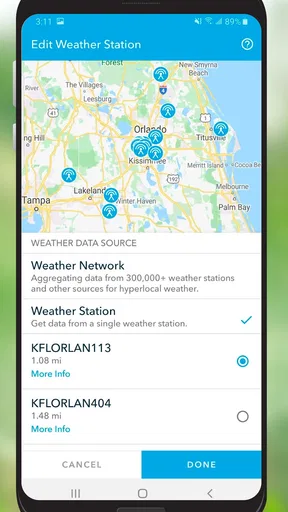
 Analysis by AppCompare
I think Rachio is most valuable when you treat it as the control panel for a smart sprinkler system, not as a standalone gardening app. It can take some of the daily guesswork out of watering, especially when a yard has several areas with different needs. But that convenience depends on having a compatible Rachio controller, so the app makes the most sense for people who are ready to manage irrigation through connected equipment rather than simply looking for plant-care reminders.
As a House & Home app from Rachio, it has a focused job: helping homeowners manage watering. The app is free to download, rated for Everyone, and has a 4.8 average from around 19,000 ratings, with over 500,000 installs. It has been available since May 2014, and version 4.21.14 is the current release. Those figures suggest a well-established product, but the more useful question is whether its way of working fits your yard and your routine.
Where automatic watering earns its keep
The biggest practical benefit is not that the app makes every irrigation decision perfectly; it is that it can reduce routine manual adjustments. Weather-aware scheduling can help avoid watering on a day when rain is expected, while zone controls let you avoid treating a whole property as if every patch of soil and every plant were identical. In my view, that combination is more useful than a simple timer, particularly for a yard with lawn, garden beds, and containers that do not all need water at the same pace.
A realistic example: imagine leaving home for a long weekend during a stretch of unsettled weather. With a conventional timer, you may have to decide in advance whether to keep the usual schedule running or switch it off and risk returning to dry beds. Rachio’s weather-based adjustments can reduce that particular worry, while the app gives you a place to review the schedule instead of relying on a physical timer beside the house. I would still check that the zones and schedule are sensible before leaving; automation is only as useful as the setup it is following.
What to consider before setting it up
There is an important trade-off behind the convenience: downloading the app alone does not automate an existing sprinkler system. You need to pair it with a Rachio smart sprinkler controller, so anyone comparing costs should account for the hardware as well as the app. The app itself is free, while in-app purchases are listed in the $29.99 to $49.99 range per item. That makes it worth checking what you actually need before spending money, rather than assuming the free download covers every part of an automated setup.
There is also some initial work involved. You have to connect the controller to Wi-Fi and define how your watering is organized. If your yard is simple and you already have a timer that you rarely change, the setup may feel like extra effort for little gain. A manual timer is cheaper and can be perfectly adequate when one schedule suits the whole lawn. Rachio is better suited to people who want more control or have enough variation across their outdoor space to justify configuring zones.
Getting Started with Rachio
First off, setting up Rachio is pretty straightforward. The app is available for both Android and iOS, and once downloaded, it guides you through a simple installation process. You’ll need to pair it with a Rachio smart sprinkler controller, which might sound intimidating at first, but trust me, it’s easier than assembling IKEA furniture.
Worth Reading Before You Choose

EA SPORTS FC Mobile 26 Is a Bigger Football Game, but It Takes Time

Flipboard Shows What News Apps Must Do Beyond the Feed

Switching to Android Auto Means Rethinking Your Driving Routine

Google Calendar Makes a Crowded Week Easier to Manage

Ludo King Makes the Most of the Minutes Between Plans

Baby Panda World Brings Quick Play to Modern Phones, but Its Game Library Feels Busy
The pairing process involves connecting to your Wi-Fi, and voila, you’re ready to roll. The app takes you through each step with clear instructions, so even if you’re not the most tech-savvy person, you’ll manage just fine. Plus, there’s plenty of support available if you hit any snags along the way.
Features that Make Rachio Stand Out
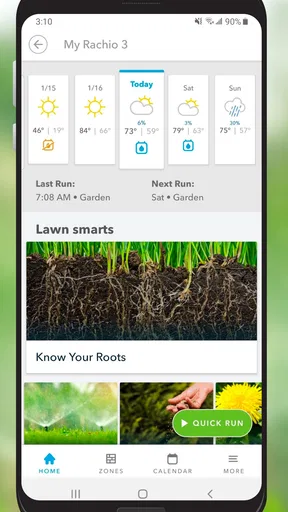
What really sets Rachio apart is its ability to make watering your garden feel like a breeze. The app uses weather forecasts to adjust watering schedules automatically. Imagine not having to worry about turning on or off your sprinklers when there’s a sudden downpour. Pretty neat, right?
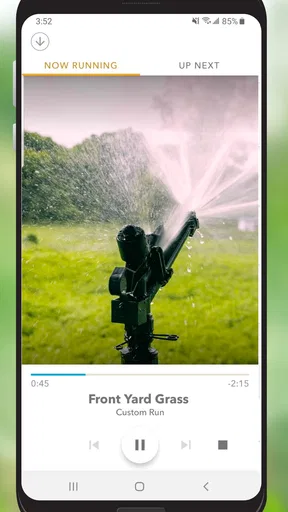
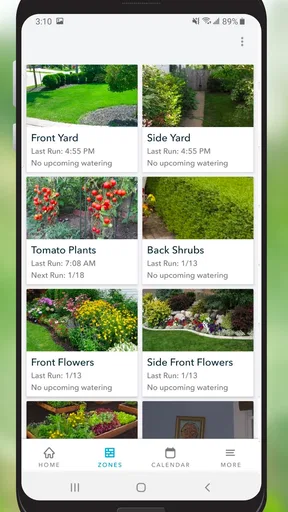
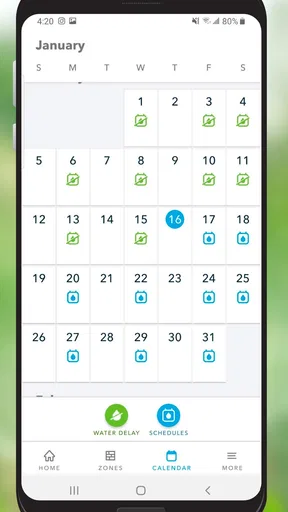
Another feature that I found super handy is its zone customization. You can divide your garden into different zones, each with its own unique watering needs. Whether it’s your thirsty tomatoes or your lush lawn, Rachio has got you covered. You can even set specific schedules for each zone, ensuring that every plant gets the right amount of TLC.
Oh, and did I mention the app’s water usage tracking? It’s like having a personal garden assistant that’s keeping tabs on your water consumption. This not only helps in conserving water but also saves you a few bucks on the water bill. Win-win!
User Experience and Interface
I’m a sucker for a good-looking app, and Rachio doesn’t disappoint. Its interface is clean and user-friendly, with intuitive navigation that makes managing your garden's watering schedule a breeze. The dashboard gives you a quick overview of everything you need, from weather updates to watering schedules.
One thing I particularly love is the app’s notifications feature. You’ll receive alerts about upcoming watering schedules and any changes due to weather forecasts. It’s like getting little reminders that your garden is in good hands, even when you’re busy with other stuff.
Who Will Benefit Most from Rachio?
If you’re someone who loves gardening but doesn’t have the time or energy to manage it all manually, Rachio is perfect for you. It’s also great for folks living in areas with unpredictable weather patterns. The app’s ability to adjust watering based on weather conditions ensures your plants are always getting the right amount of water.
Even tech enthusiasts will find joy in tinkering with the app’s various features. It’s satisfying to see how technology can transform something as mundane as watering into a streamlined, efficient process.
Making the setup work for your yard
The most useful way to approach zone customization is to group areas by how they are actually watered, not just by what they look like. A sunny strip of lawn and a shaded patch may respond differently even if they are both grass; beds with established plants may also have different needs from recently planted ones. Separating areas thoughtfully at setup gives the schedule a better chance of matching your yard, and it makes later adjustments easier to understand.
I would also treat the first schedule as a starting point rather than a set-and-forget guarantee. Pay attention to how the soil and plants respond, then adjust the relevant zone instead of changing the entire property’s schedule. That small habit is one of the best ways to make automation useful without handing every decision over to an algorithm. Weather data can help with timing, but local shade, drainage, and plant condition still matter.
Water-use tracking can be useful as a feedback tool, too. Rather than assuming that an automated schedule must be saving water, compare your habits and usage over time and look for obvious changes. If a zone runs more often than you expect, check whether its schedule reflects the plants and conditions there. The feature is most helpful when it prompts a practical review, not when it is treated as proof that every watering choice is automatically ideal.
Where it sits beside other watering options
Compared with watering by hand, Rachio can take repetitive work off your plate, but hand watering remains more flexible for a small number of pots or a compact garden where you want to inspect each plant as you go. Against a basic timer, the app’s stronger case is the combination of separate zones and weather-aware scheduling. A basic timer may still be the more sensible choice for a uniform lawn, a tight budget, or anyone who prefers not to depend on Wi-Fi-connected equipment.
It is also not a substitute for knowing what your garden needs. A forecast cannot account for every difference in soil, exposure, or plant maturity, and a schedule that works in one part of the yard may not suit another. I would use the app to reduce routine decisions, then keep an eye on the garden and make targeted changes. That balance is more realistic than expecting automation to eliminate all maintenance.
Who should choose it—and who should pass
I would recommend it most to someone with an existing Rachio controller, several irrigation zones, or a busy routine that makes manual schedule changes easy to forget. It is also a reasonable fit for people who travel and want to review watering remotely, provided they have already set up their equipment and schedules carefully. The app’s appeal grows with the complexity of the yard: the more distinct the watering areas, the more useful separate controls can become.
I would skip it if you only need an occasional reminder, rent a home where you cannot change the irrigation hardware, or are happy with a simple timer. It may also frustrate someone who expects a download to solve an irrigation problem immediately; setup and sensible zone planning are part of the commitment. If you are deciding whether to invest in the controller, first think through how many areas genuinely need different treatment. If the answer is “not many,” a simpler option may be enough.
Wrapping Up My Rachio Experience
So, is Rachio worth it? Absolutely! It’s a game-changer for anyone looking to make garden maintenance easier and more efficient. The smart integration of weather data, the ability to customize zones, and the sleek user interface all make this app a standout choice.
In conclusion, if you’re tired of playing the guessing game with your garden’s watering needs, give Rachio a try. It’s not just an app; it’s a garden companion that helps you save time, water, and effort. Happy gardening!
Pros
- User-friendly interface makes setup easy.
- Smart scheduling conserves water effectively.
- Integrates with multiple smart home systems.
- Detailed weather data for precise irrigation.
- Remote control via app is highly convenient.
Cons
- Requires strong Wi-Fi for optimal performance.
- Initial cost is relatively high.
- Limited offline functionality.
- Dependency on weather data can be inaccurate.
- No manual controls on the device itself.
FAQs for Rachio
What is Rachio and how does it work?
Rachio is a smart sprinkler controller that helps you manage your lawn watering schedule efficiently. It connects to your home Wi-Fi and uses local weather data to optimize your watering schedule. This ensures your lawn gets the right amount of water while conserving resources and saving on water bills.
Is Rachio compatible with my existing sprinkler system?
Rachio is designed to work with most standard sprinkler systems. It supports up to 16 zones and can replace any existing controller that operates on 24 VAC. Before purchasing, it’s advisable to check the compatibility guide on the Rachio website to ensure it fits your setup.
How does Rachio conserve water?
Rachio conserves water by using weather intelligence. It adjusts watering schedules based on real-time weather data, such as rainfall, humidity, and temperature. This prevents overwatering and helps in reducing water usage by up to 50%, while keeping your lawn healthy and green.
Can I control Rachio remotely?
Yes, Rachio can be controlled remotely via its mobile app available on both Android and iOS. The app allows you to set schedules, monitor water usage, and adjust settings from anywhere. This flexibility ensures you can manage your lawn even when you’re away from home.
Is professional installation required for Rachio?
Professional installation is not necessary for Rachio, as it is designed for easy DIY setup. The device comes with a detailed installation guide, and the app provides step-by-step instructions. However, if you’re not comfortable with electrical wiring, hiring a professional might be a good option.


